Defining Pillars

Ask for help about creating mods and scripts for Grimrock 2 or share your tips, scripts, tools and assets with other modders here. Warning: forum contains spoilers!
Post Reply
User avatar
Mysterious
Posts: 226
Joined: Wed Nov 06, 2013 8:31 am

Defining Pillars

Post by Mysterious »

Hi guys just a quick question here. Does anyone know how to define a Pillar Object I have tried the below but does not work. Not sure what I am doing wrong but sure there is simple fix. Thxs :)

Code: Select all

defineObject{
name = "wall_tower_1",
components = {
{
class = "Model",
model = "mod_assets/models/houses/walltower.fbx",
},

{
class = "Pillar",  --- This does not work ---
hitSound = "barrel_hit",
hitEffect = "hit_wood",
},

},
placement = "wall",
editorIcon = 120,
}
User avatar
Leki
Posts: 550
Joined: Wed Sep 12, 2012 3:49 pm

Re: Defining Pillars

Post by Leki »

remove pillar class for now, then

Code: Select all

placement = "pillar",
no hit effect, you cannot hit pillar - it's on the edge of the cell.
I'm the Gate I'm the Key.
Dawn of Lore
User avatar
Mysterious
Posts: 226
Joined: Wed Nov 06, 2013 8:31 am

Re: Defining Pillars

Post by Mysterious »

Thxs Leki will try it, yeah I know the sound is not meant to be there I am just practicing getting models into my mod :)

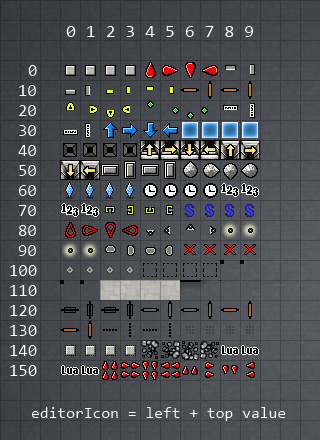
EDIT: Thxs Leki it works awesome, do you know the editorIcon? Thxs again :)
User avatar
Leki
Posts: 550
Joined: Wed Sep 12, 2012 3:49 pm

Re: Defining Pillars

Post by Leki »

Mysterious wrote:Thxs Leki will try it, yeah I know the sound is not meant to be there I am just practicing getting models into my mod :)

EDIT: Thxs Leki it works awesome, do you know the editorIcon? Thxs again :)
icon = 100

New icons are unknown for the moment, but you can use old ones for the moment.
Image
I'm the Gate I'm the Key.
Dawn of Lore
Post Reply