Page 1 of 2
[ANNOUNCEMENT] First LoG 2 Engine Mods :-)
Posted: Tue Apr 01, 2014 6:59 pm
by Leki
Hi guys,
as you know few of us have full access to LoG2 engine (thank you AH, you gave me this great privilegy to be one of the chosen!), so I wanna share some screens (I worked really hard for a last month to achieve this) from upcoming sci-fi mod:
Spaceship Corridor 1:

Spaceship Corridor 2:

Custom monsters I just finished (there is used new multi-class monster patrol feature):

Well, it's still work in progress but I hope you like it.
Any feedback is welcome!
Re: [ANNOUNCEMENT] First LoG 2 Engine Mod by Leki
Posted: Tue Apr 01, 2014 8:30 pm
by germanny
Me too! In secret, i worked on a new mod, called
'
Asphalt Champions on the way to Tipparillo'
A mod with huge outdoor scenarios, and it will provide plenty of playing time..
There are new custom enemies, such as the '
Haunted Roadrunner' or the '
Flattened Frogs' !
A never before seen screenshot for the first time:
(Here you can see some '
Street Screamers' approaching..)
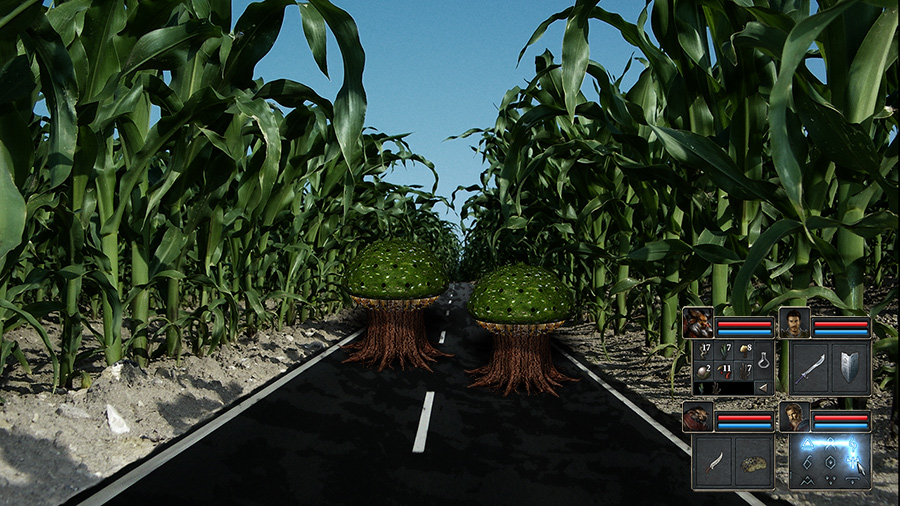
I hope to come up with the mod on April, 1st, 2015!

Re: [ANNOUNCEMENT] First LoG 2 Engine Mod by Leki
Posted: Tue Apr 01, 2014 9:27 pm
by Komag
epic!

Re: [ANNOUNCEMENT] First LoG 2 Engine Mods :-)
Posted: Wed Apr 02, 2014 10:54 am
by Mysterious
Well you guys are lucky.
(a) So I was wondering will Scripts from LOG1 still work in the new LOG2?
(b) Will models that the guys have made over the few years, can they be imported into the new Engine?
(c) Will it be the same modeling and textures routine like LOG1? Or is it easier to do?
(d) I just want to know will I be able to copy my levels and paste them into the new Engine with the Scripts I am already using, the items, and custom objects the I have already made?
I hope you say yes to the above or something

Otherwise I should disband the LOG1 Mod and start again (:
So thxs..
Re: [ANNOUNCEMENT] First LoG 2 Engine Mods :-)
Posted: Wed Apr 02, 2014 11:22 am
by Xanathar
... These posts were from yesterday.
... Check again which date it was ...
Re: [ANNOUNCEMENT] First LoG 2 Engine Mods :-)
Posted: Wed Apr 02, 2014 1:09 pm
by antti
Great work with mods, guys!

Mysterious wrote:
(a) So I was wondering will Scripts from LOG1 still work in the new LOG2?
(b) Will models that the guys have made over the few years, can they be imported into the new Engine?
(c) Will it be the same modeling and textures routine like LOG1? Or is it easier to do?
(d) I just want to know will I be able to copy my levels and paste them into the new Engine with the Scripts I am already using, the items, and custom objects the I have already made?
a: Most scripts won't probably work right out of the box (mostly since we implemented component system into the game objects) but in general it should be quite straightforward to fix the scripts.
b: The file formats for the models and animations (.fbx) haven't changed so the models themselves should work. The format for object and monster definitions have changed (due to the component system again) but it's quick and easy to fix those.
c: The routine to get the models and textures into engine will probably remain the same
d: Copypasting won't unfortunately work. The level format has changed quite a bit since the new game knows a lot of tricks the old one didn't so you won't be able to open the old levels with the new editor.
Re: [ANNOUNCEMENT] First LoG 2 Engine Mods :-)
Posted: Wed Apr 02, 2014 7:59 pm
by JohnWordsworth
In terms of mod-tools and 3D content for LOG, I'm working on the 'Grimrock Model Toolkit 2' which I hope to have ready very close to the release of LOG2 which will support opening new and old models and animations - so even if the file formats do change a bit between the two, you'll just have to open the model and 'save as' to LOG2.
The GMT2 will also have much better support for FBX files, so you'll be able to import animated 3D content as long as it fits the rough requirements for LOG2 (the correct number of bone weights per vertex etc).
Re: [ANNOUNCEMENT] First LoG 2 Engine Mods :-)
Posted: Wed Apr 02, 2014 10:04 pm
by Mysterious
Ok that sounds good and bad, thxs for the answers John and antti.
John I am glad you are making the Second version of GMT, it is a awesome tool for doing the Objects as I have found.
Umm antti I assume you are with AH? I have seen some of your posts, sorry I thought you were a Modder
For example will the Alcoves and Altars have the same function as LOG1? Well anyway I cant wait to see the new Editor and use it. Thank you for the answers of my questions.
John I have noticed when I am using Graphic Tool Kit for making custom Atlas - I am not sure how to reload my custom atlas back into the program. I must be missing something. I did a test run with 4 x 2d Icons and they work, then I wanted to load the Atlas file up again so I could add more Icons, but I failed to figure how to reload the file (test_atlas.dds) that I created.. Thxs for help
Re: [ANNOUNCEMENT] First LoG 2 Engine Mods :-)
Posted: Thu Apr 03, 2014 2:05 am
by Isaac
Mysterious wrote: I am not sure how to reload my custom atlas back into the program. I must be missing something. I did a test run with 4 x 2d Icons and they work, then I wanted to load the Atlas file up again so I could add more Icons, but I failed to figure how to reload the file (test_atlas.dds) that I created.. Thxs for help
I cannot run it at the moment (on an XP machine), but there is a menu option to import a PNG atlas.
Re: [ANNOUNCEMENT] First LoG 2 Engine Mods :-)
Posted: Thu Apr 03, 2014 8:34 am
by JohnWordsworth
Hi Mysterious! Oh wow, I didn't realise anyone was even using the Graphics Atlas Toolkit so I had kind of left it out to dry for a while. The preferred method of using the Atlas Generator is to keep your folder of source files somewhere with your asset sources and just regenerate it every time.
So, for each atlas I maintain I have a folder on my HDD containing all of the PNGs. Prefix their file names with number so that they are always in the same order when loaded - so something like..
WeaponAtlas/00-Kunai.png
WeaponAtlas/01-Dagger.png
...
Then, just regenerate the atlas everytime you add a new icon from the source folder (just a couple of clicks). As Isaac stated, you can also save the atlas as a .PNG at the same time as you generate the .DDS and then load the PNG back in from the menu if you prefer to do that (but keeping the source files always feels safer to me!). I don't think I have yet provided an option to load in the .DDS file as I remember having some issues making sure I supported all different types of .DDS files. I don't really want to provide the feature if it's half-complete, yet supporting all of the .dds formats seemed like a bit of a waste of time and effort.