Page 1 of 1
converting difuse texture to normal
Posted: Wed Dec 23, 2015 8:13 pm
by bongobeat
Hey there,
is that possible that someone makes me 2 normal textures please?
I ve followed the tutorial from Leki but I think I've done something wrong.
I have some small black zones when rendering the texture in the editor.
a screenshot without light:
with a torch:
Re: converting difuse texture to normal
Posted: Sat Dec 26, 2015 9:22 pm
by Skuggasveinn
Hi
I'm willing to help you out, just know that if you are taking a diffuse map and simply rearranging the color channels that will never work, It needs to be normal map to begin with.
Leki's tutorial was about taking a log1 normal map and changing it to log2 normal map, it does not cover taking a diffuse map and changing it to a normal map.
Nvidia's filters along with other software like crazybump, MindTex and others can take a diffuse map and "generate" a normal map from it. That generation process does a lot of guessing and you will always get a quick and dirty result.
The proper way is to bake the normal map from a high poly mesh, in many cases that means that you will have to create that high poly mesh and that can be a lot of work, hence programs like crazybump exist for people willing to settle.
But like I said, willing to help you out, I have both photoshop with nvidia filters and also MindTex that I can run your diffuse map through, you just need to explain to me what it is that your are creating, is this a glass window ? , if so is it a whole glass plain or are the green/greyish straight lines separating the different window plains ? and so on.
best regards.
Skuggasveinn.
Re: converting difuse texture to normal
Posted: Mon Dec 28, 2015 1:37 am
by bongobeat
ah ok! my misunderstanding so!
That's why my normal maps are totally wrecked then.
Well I want to use these textures for a wall, mosaic/stone type. It replace the inside wall tile texture that is used in the castle wallset.
I wanted a type of fractal texture, but I did not find something nice, as the diffuse texture has to be well done for the castle wall model. So I finally pick these one.
here is the 2 diffuse textures. I think a simple conversion will do if those black zone aren't seen anymore.
http://www.photo-graphix.fr/storephoto/grim/palace.rar
Re: converting difuse texture to normal
Posted: Mon Dec 28, 2015 3:58 am
by Skuggasveinn
I took a swing at this.
here is the result.
http://www.zorglubb.net/grimrock/dropzo ... xtures.zip
its always a question of how much influence the normal map should have, here you can see the results with and without the diffuse.
there are still so "black spots" inside the purple mosaik texture but they are part of the diffuse, black color is a black color, spec will only make it shiny or dull black, normal will make it stick out or in

hope that helps.
Skuggasveinn.
Re: converting difuse texture to normal
Posted: Mon Dec 28, 2015 12:12 pm
by bongobeat
this looks fine, thanks a lot for your work!
Re: converting difuse texture to normal
Posted: Wed Dec 30, 2015 5:51 pm
by kelly1111
may I ask a favor ?
Can someone please make me a normal map for the following texture
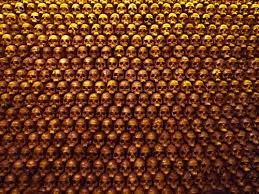
Or does anyone have something similar as a wall texture to use?
Re: converting difuse texture to normal
Posted: Sun Jan 10, 2016 4:16 pm
by bongobeat
this texture is too small, didn't you have something bigger?
this texture, which actually is not a proper size and need to be resized, is similar to texture used on items (in size), so if you plan to put something like that on a wall, the result will be horrible
 with a torch:

