So quick question here,
how do i make the X,Y of each level in the dungeon editor larger?
Size adjustments
Re: Size adjustments
You can't. Levels are always 32x32.
Grimrock 1 dungeon
Grimrock 2 resources
I no longer answer scripting questions in private messages. Please ask in a forum topic or this Discord server.
Grimrock 2 resources
I no longer answer scripting questions in private messages. Please ask in a forum topic or this Discord server.

Re: Size adjustments
The only way to do this is a trick. Some early dungeon crawlers; those before built in automaps, could present a map layout that was not visually something that would fit in it's max level dimensions (in this case 32x32). The players were mapping their own maps, and didn't actually have to be told or shown that it was a trick. If the maps don't connect back on themselves, the only way to know about it, is the automap.
The trick is to have the part of the map seem to stretch off past the outer edge, and teleport the party to some other room fit somewhere on the map. If the player does not have access to the automap, the same trick would work with multiple 32x32 maps.
Here is a tricky example from my 'Eye of the Beholder' map, but generally just a 4 tile hallway will do.

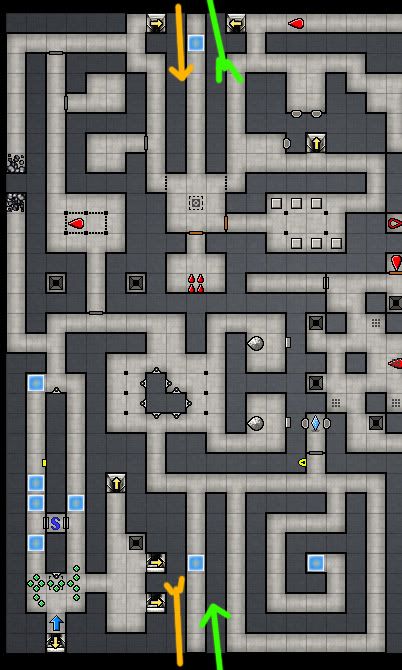
The trick is to have the part of the map seem to stretch off past the outer edge, and teleport the party to some other room fit somewhere on the map. If the player does not have access to the automap, the same trick would work with multiple 32x32 maps.
Here is a tricky example from my 'Eye of the Beholder' map, but generally just a 4 tile hallway will do.
Re: Size adjustments
That doesn't account for items, monsters, etc. though. I strongly recommend not doing it because of that.
Grimrock 1 dungeon
Grimrock 2 resources
I no longer answer scripting questions in private messages. Please ask in a forum topic or this Discord server.
Grimrock 2 resources
I no longer answer scripting questions in private messages. Please ask in a forum topic or this Discord server.
Re: Size adjustments
You mean the level change? Yes it should have a script check/move any items present.minmay wrote:That doesn't account for items, monsters, etc. though. I strongly recommend not doing it because of that.
It is possible to even offset the tracked items outside the of the map, if they could be seen at a distance.
In my case the reason for doing this (trick) was to be accurate to the original map in EoB ~which did this, but there are easier/better ways if the layout is mutable.