How can I solve this error?

Have trouble running Grimrock 1 or you're wondering if your graphics card is supported? Look for help here.
Post Reply
Treth
Posts: 1
Joined: Thu May 03, 2012 10:39 pm

How can I solve this error?

Post by Treth »

I see only a black screen when I enter the game. Showing only lights the torches. No textures. No graphics. I can see only the light of the torch. Does anyone know how is this a bug?


my system

i7 950 cpu
ati hd 5970 graphic card.


Sorry for bad english lang.

i take screenshots..
SpoilerShow
Image
SpoilerShow
Image

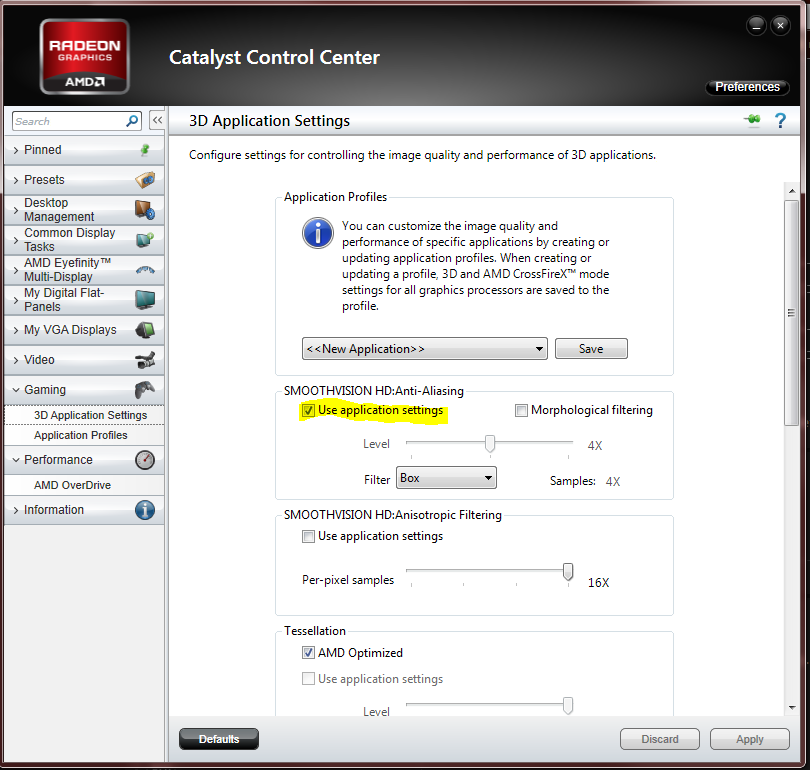
Edit : ok. i solve this problem i change catalyst options all default.
earthyearth
Posts: 102
Joined: Sat Mar 31, 2012 2:57 am

Re: How can I solve this error?

Post by earthyearth »

try changing your catalyst options to all default
User avatar
zalewapl
Posts: 45
Joined: Sun Apr 22, 2012 12:39 am

Re: How can I solve this error?

Post by zalewapl »

Disable anti-aliasing enforcing in video card drivers settings.
TigerJ
Posts: 3
Joined: Sat May 05, 2012 3:59 am

Re: How can I solve this error?

Post by TigerJ »

I just found this thread and thisis the box I marked to fix it https://lh4.googleusercontent.com/-PeqI ... apture.PNG
Post Reply